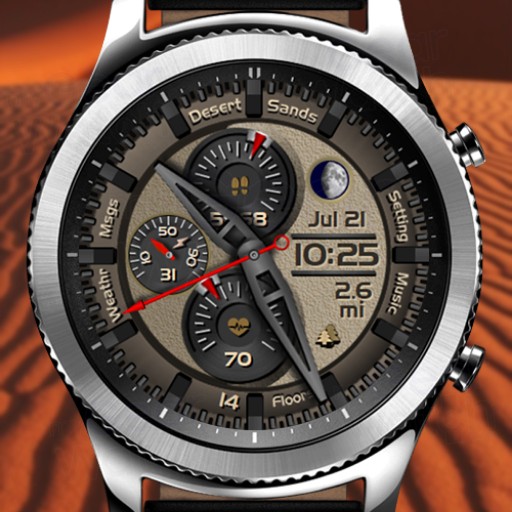
Desert Sands (Wilderness Series)
1.0.1
- S2
- S3
- Sport
paid
View watchface in Samsung Store Send Link
Desert Sands
Part of the new Wilderness series.
Inspired by our planet's remaining natural
wilderness, Desert Sands captures the blowing
sand dunes that are constantly changing.
FEATURES:
- AOD mode for S3, S2 and Sport
- Battery percentage gauge and display
- Step percentage gauge and step count
- Heart rate gauge with digital display
- Date display
- Moon phase display
- Distance display with auto units km and miles (see note 1)
- Floors count display (see note 2)
- 12/24 hour digital display (see note 3)
SINGLE TAP ACTIONS:
- Tap the date for Schedule
- Tap the digital time for the Alarm
- Tap the HR dial for SHealth Heart Rate Measurement
- Tap the battery dial for Battery Status
- Tap the steps dial for SHealth Steps
- Tap the Floors display for SHealth Floors
- Tap Setting for Gear settings
- Tap Music for the Music Payer
- Tap Weather for the Weather display
- Tap Msgs to see your Messages
Note 1: Distance Display
Auto units works by reading the SHealth settings for distance
units and changes automatically. Setting to km in the SHealth
settings (on your phone), changes the watch to display to km.
Setting to miles in the SHealth settings (on your phone),
changes the watch display to show miles.
Note 2: Floors Count
Floors count only works with S3 and Sport versions. Samsung has
not implemented this feature for the S2. S2 will display a "0"
for floors count.
Note 3: 12/24 hour
The face will automatically show either 12 hour time or 24
hour time. This is based on the time settings on your phone.
To change to either 12 or 24 hour time format, change the format
in your phones settings for time.
Follow SBWatchfaces on...
Google+:
https://plus.google.com/u/0/collection/ckVemB
Facebook:
https://www.facebook.com/sbwatchfaces/
Instagram:
https://www.instagram.com/sbwatchfaces/
SBWatchfaces Samsung seller page:
http://galxy.us/sbw
Other Desert Sands (Wilderness Series) Images